Categories
English Middleware Technical

Introduction to IBM MQ – Part 2

Introduction to IBM MQ

Part 2

MQ Object Naming Conventions

Some of the rules for naming MQ objects such as queue managers and queues are given below :

  • Names of the MQ objects listed below are limited to 48 characters.

Queue managers, Queues, Process definitions, Namelists, Clusters, Listeners, Services, Authentication information objects and Topics and subscriptions

  • MQ Object names should have these character set :    A-Z,a-z,0-9, and the characters . / % _
  • MQ channel names should have a maximum of 20 characters
  • Object names that begin with “SYSTEM” are reserved
  • Names are case sensitive
  • The rules for naming MQ objects are the same on all supported operating systems. No implied structure exists in a name that you might find in the rules for file names on many operating systems
  • Agree with all stake-holders regarding all MQ object names before implementing the MQ project.
  • Embedded or leading blank characters are not allowed in object names

MQ Messages

A message is any information that one application uses to communicate to another. A message can convey a request for a service, or it can be a reply to a request. A message might also report on the progress of another message: to confirm its arrival or report on an error, for example. A message can also carry information for which no reply is expected.

Parts of MQ messages

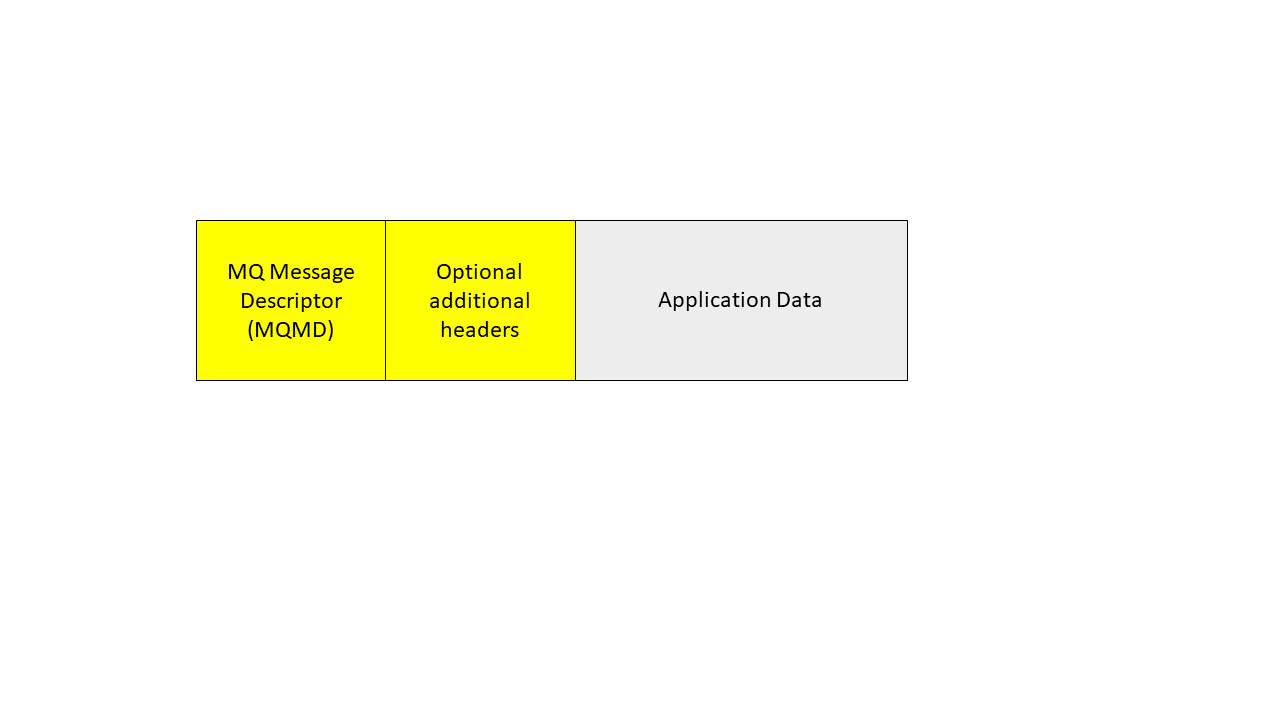
  • Application Data – Content and structure defined and understood by the application program
  • Header or Message Descriptor (MQMD) – Contains control information like type of message and priority which are understood and used by MQ
  • Can contains optional headers that contain information about message structure, intended consumers, and message properties
Other aspects of MQ Messages

  • Default length is 4 MB; the max length is 100 MB
  • Length can be restricted by the definition of MQ objects and the system storage
  • Messages can be segmented or grouped

Headers typically contain elements like:

  • Unique Message Id
  • Routing information
  • Message format

Few examples of the application data part of a message:

  • A row from a DB2 table
  • A record from an indexed or flat file
  • Individual columns from DB2 tables
  • Multiple rows or records

MQ Message Descriptor (Header) has the following info :

  • Message ID/Correlation ID
  • Date and time
  • Persistent/Non persistent
  • Version
  • Priority
  • Life time of a message
  • Coded Character Set Id
  • Format
  • Sender application and type
  • Segmentation/Grouping information
  • Report options/Feedback
  • Back out counter

MQ Message Types

Based on Retention Types, messages can be :

  • Persistent
  • Non-persistent

Functionally, MQ Messages can be :

  • Datagram
  • Request
  • Reply
  • Report


Share
Categories
English Middleware Technical

Introduction to IBM MQ – Part 1

Introduction to IBM MQ

Part 1

What is IBM MQ ?

  • IBM MQ is a message oriented middleware that can transport any type of data as messages.
  • Enables businesses to build flexible, reusable architectures such as service oriented architecture (SOA) environments or microservice architecture environments.
  • It provides a reliable “store-and-forward” transport for program-to-program communication.

IBM MQ is made up of one or more queue managers. Queue managers are where messaging resources, such as queues, are configured and what applications connect to, either running on the same system as the queue manager or over the network.

Message delivery over a network of connected queue managers is assured (because IBM MQ exchanges messages transactionally) and decoupled (because applications do not have to check that messages they sent are delivered safely) from the application.

Using MQ system, messages can be exchanged between applications running across dissimilar systems such as Windows, Linux, z/OS, IBM i, etc. Application programmers do not need to have communications programming knowledge in order to send and receive messages across the MQ system.

You can secure message delivery between queue managers with TLS. With Advanced Message Security (AMS), you can encrypt and sign messages between being put by one application and retrieved by another.

In summary, IBM MQ provides effective messaging which implies reliability, universal connectivity, flexibility and scalability.

Modes of Operation

IBM MQ can operate in the following modes :

Messaging

Programs communicate by sending each other data in messages rather than by calling each other directly.

Queuing

Messages are placed on queues, so that programs can run independently of each other, at different speeds and times, in different locations, and without having a direct connection between them.

Point-to-point

Applications send messages to a queue and receive messages from a queue. Each message is consumed by a single instance of an application. The sender must know the name of the destination, but not where it is.

Publish/subscribe

Applications subscribe to topics. When an application publishes a message on a topic, IBM MQ sends copies of the message to those subscribing applications. The publisher does not know the names of subscribers, or where they are coming from.

File transfer

Files are transferred in messages. Managed File Transfer manages the transfer of files and the administration to set up automated transfers and log the results.

Telemetry

MQ Telemetry provides an IBM MQ Telemetry Transport (MQTT) server that extends your IBM MQ environment to the “Internet of Things” – that is, the numerous mobile, web and M2M devices and applications that sit at the edge of the network.

Components of MQ System

The MQ system mostly consists of the following components :

  • Messageswhich contain application data
  • Queueswhich hold messages
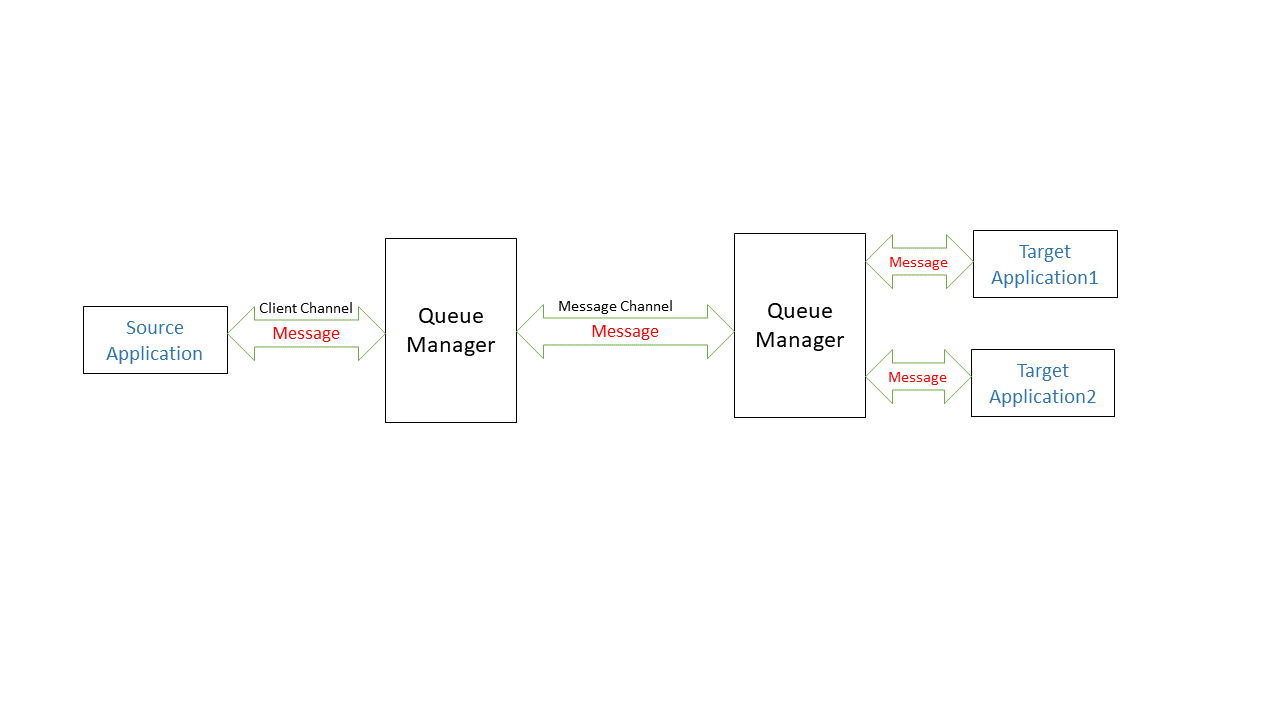
  • Channelswhich connect queue managers and client applications
  • Queue manager – which manages messages, queues, channels, and other IBM MQ services and resources

An MQ server controls the computer that contains the MQ configuration. Computers that contain client applications that must connect to the MQ server must also have an MQ client installation. It is possible to have both an MQ server and an MQ client installation on the same computer.


Share